The assistant your lab never hadNew
Kim, your lab’s
front desk.
Kim reads the lab’s mail on your Mac, clears the noise, and puts a short list on your desk. More time for doing science.
native macOS · v0.6.0 · release notes · Mac App Store soon
on-device classifiers · Blablador, your own endpoint, or a managed local model · no vendor cloud
- 01Re: Reviewer 2, revision due14 days → task · reply drafted
- 02HR: contract ends Sep 30expensive to miss · needs a decision
- —Fwd: Fwd: seminar room clash136 filed as noise
What's new in 0.6.0
This is the release where the app becomes Kim.
Identity
Kim's mark, everywhere
The pearl runs through the sidebar, the launch screen, quick capture, and a redesigned onboarding welcome. It animates while sync or AI work is running, so you can see when Kim is busy. The app icons are rebuilt from the new tile artwork.
Local models
One card, one download
Local intelligence setup is a single card now. One Download fetches the chat and embedding models together with combined progress, and Remove frees both.
Reliability
Nothing lost on the way out
Sync health monitoring, a local mutation queue, and automatic database backups. Quitting waits for pending writes and local-model shutdown, with a bounded fail-safe.
Why a front desk
The desk work nobody hands off anymore.
Labs used to have someone who opened the post and chased the deadlines. That position is gone, and the work moved into your inbox: newsletters, system notices, a steady drip of spam, and a handful of things that genuinely need you buried inside. Kim picks it back up.
How Kim learns
Swipe once. Teach it forever.
Kim shows you the mail it isn’t sure about, one card at a time. Every swipe is a training example, and the two classifiers behind it run entirely on your Mac. The more you answer, the more Kim settles before you even look.
ACTION→ACTIONLATER↓
Four ways to answer, the same four as in the app: right makes it a task, left clears it, up junks it, and down snoozes it until tomorrow.
Only up and the two horizontal answers train anything. Snoozing costs Kim nothing and buys you a quiet afternoon.
Action-item finder
Learns what needs you
Every “action” and “no action” teaches Kim the difference. New mail arrives pre-scored, so what needs a reply rises to the top on its own.
Spam filter
Learns your junk
It learns from the messages you junk, so it fits your mail rather than a shared blocklist. Kim flags the obvious ones and can move the worst offenders out of sight.
Both models are trained and stored on your Mac with Apple's Core ML. No message text is ever uploaded to train them.
Quick capture
Kim, one button away.
Hit ⌘L anywhere on your Mac and a small box floats over whatever you are doing. Write down what happened in the lab and Kim files it: the @people, #projects and to-dos are picked out as you type. ⌘A opens the same box in Ask mode.
works outside the app · logs to your notepad
The model behind Kim
Any LLM that speaks the OpenAI API.
Tagging, task extraction, summaries, and reply drafting all run through one endpoint you configure: POST {base-url}/chat/completions with a Bearer token. If a service speaks that format, Kim can use it. Swapping models is a single field, and secrets live in the macOS Keychain by default.
At a Helmholtz center? Blablador runs open models at Forschungszentrum Jülich. Its published documentation states that request content is not retained in usage logs.
On supported Apple Silicon Macs with 32 GB of memory, Kim can install its reviewed chat and embedding models. Downloads are pinned and checksum-verified before use.
Use another compatible model on your own Mac or a server you control. A local endpoint needs no API key.
OpenAI, Azure, or anything else exposing the compatible API. Your endpoint, your key, switch anytime.
AI starts only with your consent. After the endpoint test succeeds, Kim asks you to confirm that the mailbox and related workspace data contain no information with elevated security or privacy requirements, such as patient data. AI features remain disabled until you agree.
Data protection
Kim works at your desk, not in a cloud.
Each account gets an isolated local SQLite workspace on your Mac. There is no SeqDesk cloud account and no SeqDesk sync service. Beyond your Exchange server, AI requests go only to the LLM endpoint you choose and configure:
Place one
Your Exchange server
Mail and calendar over EWS, using the server your organization already runs.
Home
Your Mac
Kim lives here: isolated local workspaces, Keychain by default, spam & action classifiers trained on-device.
Place two
The LLM you choose
Blablador, a local model, or any compatible endpoint, for tagging, tasks, and drafting.
That's the whole list. No telemetry, no analytics, no SeqDesk cloud, and no AI requests quietly routed through an undisclosed provider. Choose Blablador, another compatible service, or a local model that keeps AI processing on your Mac.
On-device classifiers
Spam and action filters train with Core ML on your Mac. Zero network calls.
Sandboxed reading pane
HTML mail renders with no JavaScript and no remote loads, so tracking pixels never fire.
Explicit secret storage
Secrets use the Keychain by default. You may explicitly choose a less-secure, unencrypted private-permissions file in the app's Application Support folder.
Delete anytime
One click wipes the local database. Your server mailbox is never touched.
Seven spaces, one Kim
Everything a working day needs, one click apart.
The sidebar switches between the app's spaces while Kim stays available beside your work. Each Exchange account gets its own workspace, so a second affiliation never bleeds into the first. Badges tell you where the day's attention is owed.
Tasks
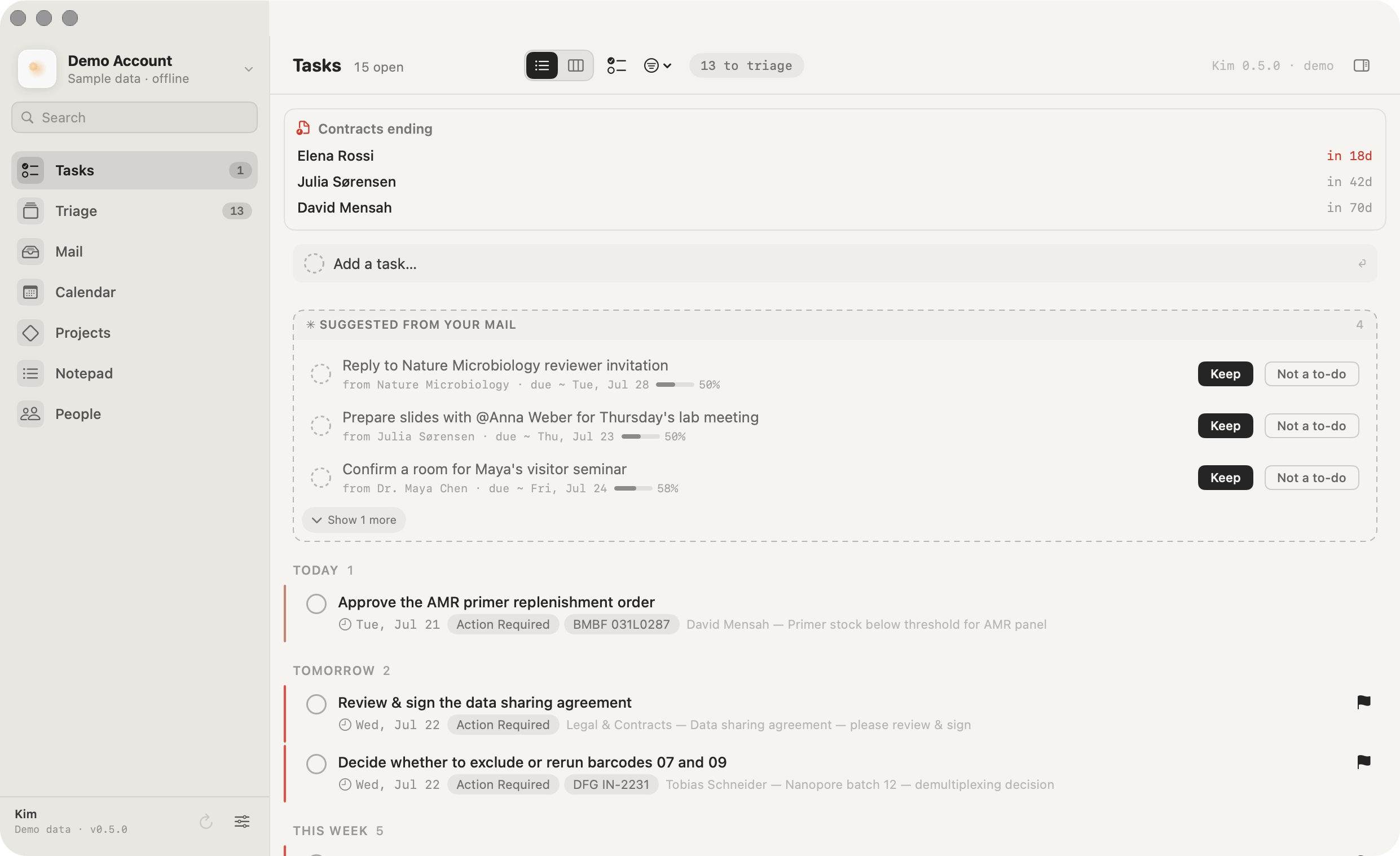
The list Kim puts on your desk, as urgency buckets or a kanban board. The badge counts what's due today and overdue.
Triage
The swipe deck. Clear the day's new mail in seconds and teach Kim as you go.
The full mailbox: threaded conversations, tag filters, search, and a sandboxed reading pane.
Calendar
Your Exchange calendar, editable: drag to move or resize, RSVP with conflict checks, and see Google feeds alongside.
Projects
Keep related messages, tasks, notes, and people together around the work they belong to.
Notepad
Durable notes inside the same account workspace, including everything you send from Quick Capture.
People
The people connected to your messages and projects, with the context you need before replying.
Ask Kim
Ask about mail, tasks, and calendar context beside any space, using the intelligence endpoint you selected.
And the rest
Kim does the tedious part. You keep the last word.
Tasks
Deadlines it can infer
Tasks carry dates Kim found stated or merely implied, like "before Friday's meeting", and drop the ones assigned to someone else.
Drafting
Replies from templates
Keep templates with placeholders. Kim picks the right one and fills the blanks for you to edit before sending.
Reading
Summaries on demand
One click condenses a long thread to a few bullets, in the email's own language, German or English.
Search
Search that understands
A precise filter language, plus optional semantic search once an embedding model is set, so you can find mail by meaning.
from:weber has:attachment after:2026-05-01
Tags
Your rules, your labels
Kim sorts mail into your own tag set with a confidence score, and learns from every correction you make.
Calendar
Editable Exchange calendar
Drag to move or resize, create on the grid, and answer invitations with a built-in conflict check.
Where Kim sits
Smart, sovereign, and native, without trading one away.
Mail clients tend to be built around a different set of priorities than a research group has. Kim is built for three at once: it triages your mail into tasks, it sends AI requests only to the endpoint you configure, and it runs as a native Mac app on the Exchange account you already have. The table below sets out how we read other tools' published feature lists on those same points, so you can see what Kim is and is not designed for.
| App | Platform | Works with your Exchange | AI triage to tasks | Choose your LLM endpoint | On-device / local AI | No vendor cloud (data local) | Team collaboration |
|---|---|---|---|---|---|---|---|
| Kim | macOS native | ● | ● | ● | ● | ● | ○ by design |
| Superhuman | Mac/iOS/Win/web | ● | ● | ○ | ○ | ○ | ● |
| Shortwave | Mac/iOS/Android/web | ○ Gmail only | ● | ○ | ○ | ○ | ● |
| Spark | Mac/iOS/Android/Win | ● | ◐ | ○ | ○ | ○ | ● |
| Missive | Mac/iOS/Android/web | ● | ◐ | ○ | ○ | ○ | ● shared inbox |
| Canary Mail | Mac/iOS/Android/Win | ● | ◐ | ◐ own key | ◐ | ○ | ◐ |
| Outlook + Copilot | Mac/Win/iOS/web | ● native | ◐ | ○ | ○ | ○ | ● |
| Apple Mail + AI | macOS/iOS native | ● | ◐ | ○ | ● | ◐ | ○ |
| Proton Mail | Web/Mac/iOS/Android | ○ own service | ○ | ○ | ◐ | ● | ● |
| MailMate | macOS native | ◐ via IMAP | ○ | ○ | ● | ● | ○ |
● yes ◐ partial ○ no
Compiled in 2026 from each vendor's own public documentation and pricing pages, and limited to the criteria above, which are the ones that matter to us. It reflects our reading at that time, not testing of every product, and “partial” is a judgement call rather than a measurement. These products are actively developed and several are strong at things this table does not ask about, such as shared inboxes and mobile apps. Please check current documentation before drawing conclusions, and tell us at pmu15@helmholtz-hzi.de if we have something wrong and we will correct it. All product names and trademarks belong to their respective owners.

Put Kim on the front desk.
Kim is developed at the Helmholtz Centre for Infection Research and is free to use. Download the latest release, connect your Exchange account, pick your model, and get your afternoons back.
macOS 14 (Sonoma) or later · universal Apple Silicon and Intel build · Developer ID signed and Apple-notarized · signed, user-confirmed in-app updates · SHA-256 checksum